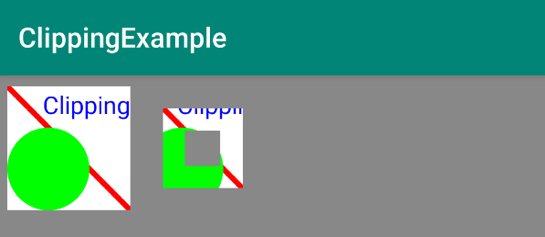
15. Implement drawDifferenceClippingExample
23 15 AAK DrawDifferenceClippingExample SC
Android Developer Documentation
- Canvas class
Here is the code:
private fun drawDifferenceClippingExample(canvas: Canvas) {
   canvas.save()
   // Move the origin to the right for the next rectangle.
   canvas.translate(columnTwo,rowOne)
   // Use the subtraction of two clipping rectangles to create a frame.
   canvas.clipRect(
       2 * rectInset,2 * rectInset,
       clipRectRight - 2 * rectInset,
       clipRectBottom - 2 * rectInset
   )
   // The method clipRect(float, float, float, float, Region.Op
   // .DIFFERENCE) was deprecated in API level 26. The recommended
   // alternative method is clipOutRect(float, float, float, float),
   // which is currently available in API level 26 and higher.
   if (Build.VERSION.SDK_INT < Build.VERSION_CODES.O)
       canvas.clipRect(
           4 * rectInset,4 * rectInset,
           clipRectRight - 4 * rectInset,
           clipRectBottom - 4 * rectInset,
            Region.Op.DIFFERENCE
       )
   else {
       canvas.clipOutRect(
           4 * rectInset,4 * rectInset,
           clipRectRight - 4 * rectInset,
           clipRectBottom - 4 * rectInset
       )
   }
   drawClippedRectangle(canvas)
   canvas.restore()
}
The code does the following:
- Save the canvas.
- Translate the origin of the canvas into open space to the first row, second column, to the right of the first rectangle.
- Apply two clipping rectangles. The
DIFFERENCEoperator subtracts the second rectangle from the first one.
Note: The method clipRect(float, float, float, float, Region.Op.DIFFERENCE) was deprecated in API level 26. The recommended alternative method is clipOutRect(float, float, float, float), which is currently available in API level 26 and higher. So be sure to check the SDK version and use the appropriate API.
Call the
drawClippedRectangle()method to draw the modified canvas.Restore the canvas state.
Run your app and it should look like this.